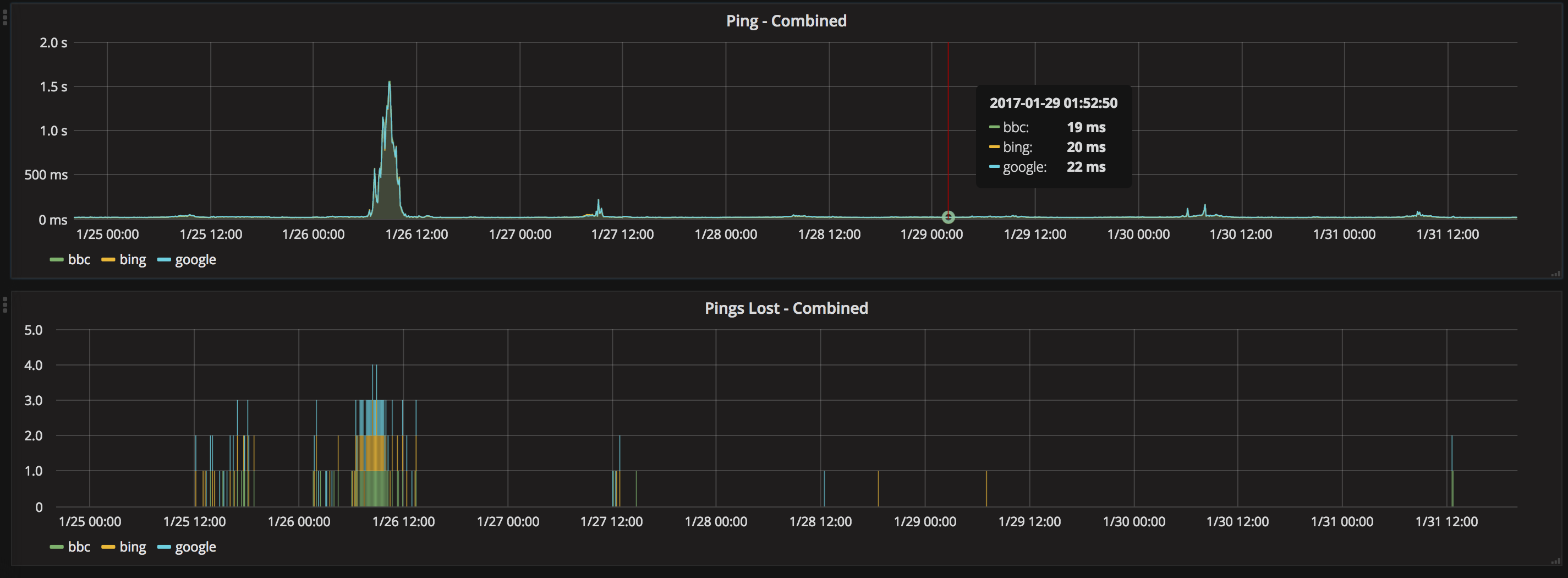
Monitoring network performance is essential for maintaining stable and reliable infrastructure. Latency spikes, packet loss, and intermittent connectivity issues can significantly impact applications and services. SmokePing is a powerful open-source tool designed to measure network latency over time, visualize performance trends, and generate intelligent alerts when problems occur.
Key Points
- SmokePing is a network monitoring tool that measures latency, packet loss, and latency distribution over time.
- It uses RRDtool to store historical data and generate clear graphs for performance analysis.
- SmokePing includes an advanced alerting system that supports threshold and pattern-based alarms.
- It can be extended with plug-ins and configured to monitor multiple targets from a web interface.
What Is SmokePing?
SmokePing is a network latency monitoring tool used to measure, store, and visualize latency, packet loss, and latency distribution over time. It sends multiple ping packets (typically 20 packets every 30 seconds) to configured targets and generates detailed graphs based on the responses received.
SmokePing uses RRDtool to maintain long-term data archives and create high-quality graphs that provide precise information about network performance and availability.
Key Features of SmokePing
Latency and Packet Loss Monitoring
SmokePing measures network latency and packet loss with high accuracy. It continuously collects data and presents it in graphical form, allowing administrators to detect performance degradation or connectivity issues.
Smart Alarm System
SmokePing includes an advanced alarm system. Instead of relying only on simple threshold-based alerts, it allows pattern-based monitoring. For example, you can configure an alert that triggers when packet loss increases from less than 1% to more than 20% and remains above that threshold for over 10 minutes.
This approach significantly reduces duplicate alerts and provides more meaningful notifications.
Alarms can be sent via email or pager, and external scripts can be triggered to automate incident handling. Complex alarm logic can also be implemented using plug-ins.
Dynamic IP Support
SmokePing supports monitoring hosts with frequently changing IP addresses. It can use SNMP to verify targets and ensure accurate monitoring even when IP addresses change dynamically.
Extensible Plug-in Architecture
SmokePing uses latency measurement plug-ins, making it easy to extend functionality and support additional monitoring methods.
How SmokePing Works
SmokePing is written in Perl and consists of two main components:
- A daemon process responsible for collecting data
- A CGI script responsible for displaying results in a web interface
The CGI script can run using SpeedyCGI to achieve performance similar to mod_perl without requiring full mod_perl deployment.
Installing SmokePing on Linux
SmokePing can be installed on most Linux distributions.
Install SmokePing on Ubuntu or Debian
sudo apt-get update
sudo apt-get install smokeping
sudo systemctl restart smokeping
Install SmokePing on CentOS
yum install smokeping
systemctl restart smokeping
Configuring SmokePing
The main configuration file is located at:
/etc/smokeping/config
Additional configuration files are stored in:
/etc/smokeping/config.d/
General Configuration
Edit the general configuration file:
vi /etc/smokeping/config.d/General
Example configuration:
@include /etc/smokeping/config.d/pathnames

owner = Andrew Zimmers
contact = [email protected]
cgiurl = http://www.website.net/cgi-bin/smokeping.cgi
mailhost = smtp.website.net
syslogfacility = local0
Ensure that the mailhost parameter contains the primary MX server for your email domain.
Configure Alerts
Edit the alerts configuration file:
vi /etc/smokeping/config.d/Alerts
Example:
to = [email protected]
from = [email protected]
Configure Targets
To define monitoring targets, edit:
vi /etc/smokeping/config.d/Targets
In this file, you can specify the hosts or networks you want SmokePing to monitor.
Why Use SmokePing for Network Monitoring?
SmokePing provides detailed historical latency analysis, intelligent alerting, and flexible configuration. It is especially useful for system administrators and network engineers who need continuous monitoring of servers, routers, or remote network locations.
In environments where performance and uptime are critical, combining SmokePing with reliable infrastructure can make a significant difference. If you are deploying monitoring tools on your own servers, consider our VPS Apps hosting solutions, which offer powerful, scalable virtual private servers suitable for running network monitoring stacks and automation tools.
With proper configuration, SmokePing becomes a powerful tool for diagnosing packet loss, jitter, and network instability over time.


