
Resilio Sync (formerly known as BitTorrent Sync) is a powerful P2P file transfer tool based on the torrent protocol. Unlike classic cloud storage, its main advantages are speed, simplicity, and a decentralized architecture. The more “nodes” you add to your network, the faster your data can be synchronized across your devices simultaneously.
Key Points
- Resilio Sync uses P2P technology to bypass centralized servers for maximum privacy and speed.
- The software works exceptionally well on Linux, supporting both Debian/Ubuntu and CentOS/RHEL.
- Automating the startup process ensures your synchronization node is always active after a reboot.
- MVPS provides the high-performance, unmanaged infrastructure needed for high-bandwidth P2P transfers.
- Users are responsible for securing the web interface and managing their own encryption keys.
Installation Methods for Linux
Depending on your preference and distribution, you can install Resilio Sync manually or via official repositories for easier updates.
Method 1: Manual Installation
For Ubuntu/Debian x64, download the .deb package and install it using:
dpkg -i resilio-sync.deb
For CentOS/RHEL x64, download the .rpm package and use:
rpm -i resilio-sync.rpm
Method 2: Installing from Repository (Recommended)
Using repositories ensures you always have the latest security patches. For Debian/Ubuntu, add the repo and GPG key:
echo "deb http://linux-packages.resilio.com/resilio-sync/deb resilio-sync non-free" | tee /etc/apt/sources.list.d/resilio-sync.list
wget -qO - https://linux-packages.resilio.com/resilio-sync/key.asc | sudo apt-key add -
apt-get update && apt -y install resilio-sync
For CentOS/RHEL, create the repo file: nano /etc/yum.repos.d/resilio-sync.repo and paste the configuration. Then import the key and install:
yum -y install resilio-sync && yum update resilio-sync
To ensure your synchronization node starts automatically with the system, use: systemctl enable resilio-sync.
Essential Configuration and Security
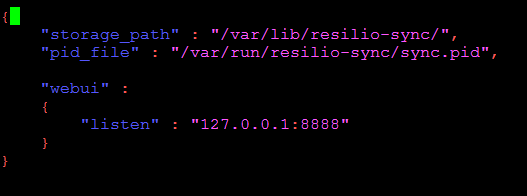
By default, Resilio Sync listens on the localhost. To grant public web access, you must edit the /etc/resilio-sync/config.json file and set your desired public port. Always ensure you set a strong username and password immediately after the first restart to protect your data.
When managing users and permissions for your sync folders, tools like the getent command can be very useful for verifying service account details. Furthermore, if you need to protect specific files within your sync directory from accidental deletion or modification, you can learn about changing file attributes with the chattr command.
Change the IP address and desired web port in the config file to allow public access as shown below:
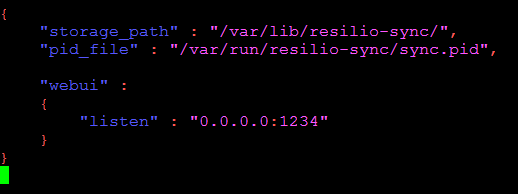
Next, restart the service to apply changes: service resilio-sync restart. Make sure to allow your chosen port in your firewall and set the correct ownership for your download folders:
chown -R rslsync:rslsync /path/to/your/folder
Conclusion: Building Your Private Data Network
Setting up a Resilio Sync node on a Linux VPS provides you with a reliable, high-speed anchor for your decentralized data network. By utilizing P2P technology, you regain control over your file synchronization without relying on third-party cloud providers.
Managing your own private cloud is a key advantage of the unmanaged hosting model. At MVPS, we provide the rock-solid infrastructure and high-speed network backbone required to sustain the heavy traffic typical of P2P synchronization. Take advantage of our optimized NVMe storage and global connectivity to keep your data perfectly synced across the world.


