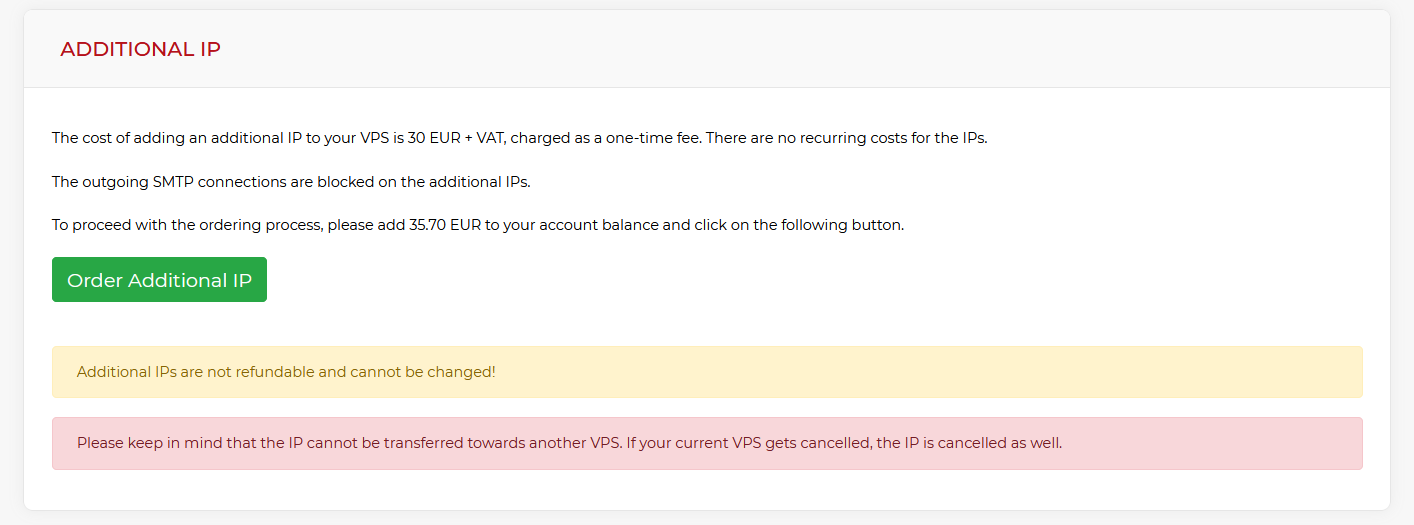
We are excited to announce a new feature for our VPS services designed to provide more flexibility for your online projects. Now you can get additional IPs for your VPS at a one-time cost of 30 EUR + VAT, ensuring your server has the connectivity it needs.
Key Points
- Additional IPv4 addresses are available for a one-time fee with no recurring monthly costs.
- The IP is assigned for the entire lifetime of your VPS.
- Manual static configuration on a network interface alias (e.g., eth0) is required.
- Extra IPs are non-transferable between servers and are non-refundable.
The additional IP is added for the entire lifetime of your VPS, meaning there are no extra monthly costs or hidden fees once purchased. This makes it a cost-effective solution for users running multiple SSL certificates, mail servers, or specialized applications. To complement your network setup, you may also want to explore our new feature: DNS hosting, which allows for easier domain management directly from our infrastructure.
How to configure the extra IP on your VPS?
Once you have purchased an additional address, you will need to assign the IP statically within your operating system. This is usually done by creating an alias on the public network interface, typically eth0 or ens3.
Please keep in mind the following terms regarding this new VPS feature:
- The IPs are not transferable to other servers once assigned.
- Payments for additional IPs are non-refundable.
- The price for new orders is subject to change depending on the current IPv4 market conditions.
Why use additional IPs for your server?
Having an extra IP allows for better isolation of services and can improve the reputation of your primary mail server. By utilizing optimized RAM and DISK resources alongside multiple network addresses, you can scale your unmanaged VPS to handle more complex workloads.
As these are unmanaged services, our support ensures that the additional IP is correctly routed to your server and that the underlying network functions are working. However, the manual configuration within the Linux or Windows environment is the responsibility of the administrator.