
MetaTrader is the industry-standard platform for Forex trading, valued for its robust charting tools and support for automated trading scripts. While native to Windows, it can be seamlessly installed on Linux using a compatibility layer. This tutorial covers the installation of MetaTrader on an Ubuntu RDP-enabled VPS, providing a stable environment for 24/7 trading operations.
Key Points
- Running MetaTrader on a Linux VPS ensures high uptime for automated Expert Advisors (EAs).
- Wine acts as a compatibility layer, allowing Windows applications to run efficiently on Linux.
- An RDP-enabled VPS is required to access the graphical user interface of the trading platform.
- MVPS provides the high-performance, unmanaged infrastructure needed for low-latency trading.
- Users are responsible for the installation, security, and management of their trading software.
Prerequisites for Installation
To get started, you will need a reliable server environment and a way to access it remotely. We recommend an Ubuntu RDP-enabled Linux VPS; you can find high-performance options at MVPS.NET. For a smooth trading experience, the minimum recommended configuration is our Basic variant.
You will also need an SSH client like PuTTY to perform the initial system updates and Wine installation.
1. Installing Wine on Ubuntu
Wine is a free software compatibility layer that allows applications developed for Windows to run on Linux. Follow these commands in your terminal to set up the repository and install the stable version of Wine:
# Add architecture and update repo:
sudo dpkg --add-architecture i386
wget -nc https://dl.winehq.org/wine-builds/winehq.key
sudo apt-key add winehq.key
sudo apt-add-repository https://dl.winehq.org/wine-builds/ubuntu/
sudo apt update

# Install Wine stable version:
sudo apt-get -y install wine-stable winetricks
sudo apt-get -y install --install-recommends winehq-stable
sudo winetricks winhttp
2. Deploying MetaTrader 5/4
Once Wine is configured, download the MetaTrader package directly from the official website:
https://www.metatrader5.com/en/download
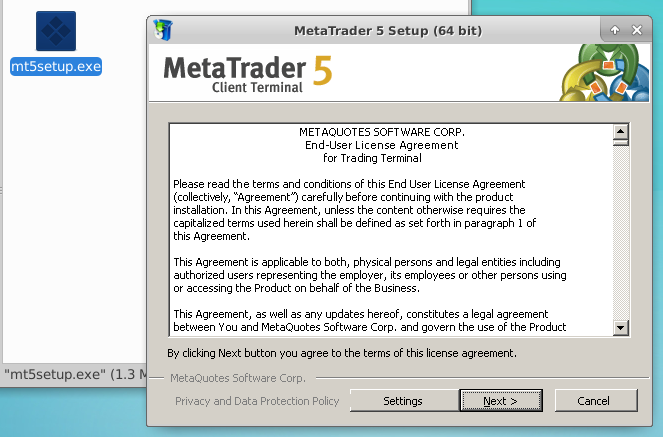
Navigate to your download folder using your RDP session, right-click the installer, and select “Open with Wine Windows Program Loader”. Follow the prompts as you would on a standard Windows PC.
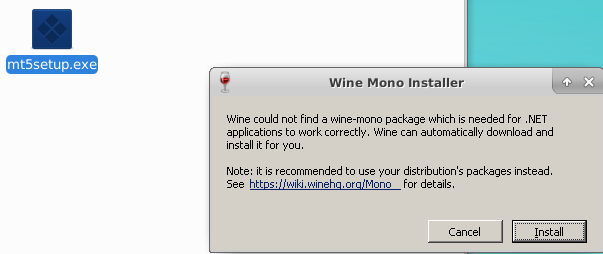
Proceed with the installation until the process is complete. You will then be greeted by MetaTrader running natively on your Linux VPS environment.
Conclusion: Optimizing Your Trading Environment
Setting up MetaTrader on a Linux VPS combines the stability of Linux with the specialized functionality of Forex trading tools. By utilizing a dedicated virtual server, you ensure that your trading algorithms and Expert Advisors can operate without interruption, regardless of your local internet connection.
Managing your trading infrastructure is a key advantage of our unmanaged hosting model. At MVPS, we provide a rock-solid, high-performance foundation that gives you the administrative freedom to optimize your setup for maximum efficiency. Experience the power of low-latency trading on our optimized network today!


