
Rust is a rather new and open source programming language designed for speed, safety and concurrency. Rust is a modern, open-source programming language designed with a strong focus on performance, memory safety, and concurrency. It is widely used for system-level development, including operating systems, device drivers, and high-performance applications, while still remaining approachable and efficient for everyday programming tasks.
Key Points
- Rust is an open-source programming language focused on speed, safety, and concurrency, suitable for low-level coding.
- Installing Rust on a Linux machine is straightforward, requiring a basic setup and running a specific command.
- Rust has a fast-release schedule of six weeks, and users should check for new builds regularly.
Prerequisites for Installing Rust on CentOS
Installing Rust on a Linux machine is straightforward thanks to the official installation script. Before starting the installation, make sure you have a basic CentOS system, an up-to-date package list, and curl installed.
yum -y update
yum -y install curl
Installing Rust on CentOS Using rustup
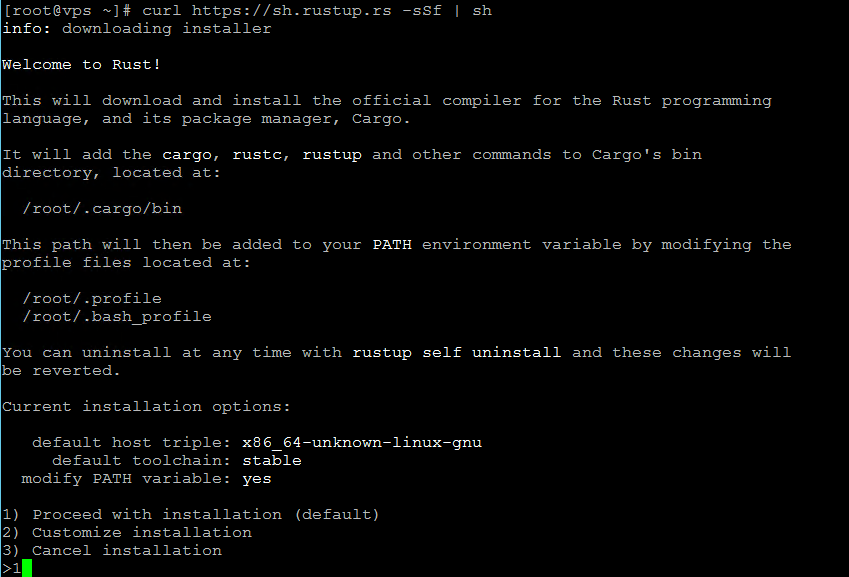
And now, the install itself is running the following command while following the instructions shown:
curl https://sh.rustup.rs -sSf | sh
During the installation process, you will be prompted to select a setup method. The default option is recommended for most users.
After the installer finishes, it displays additional information about configuring your Rust environment. To apply the changes, log out and log back in.
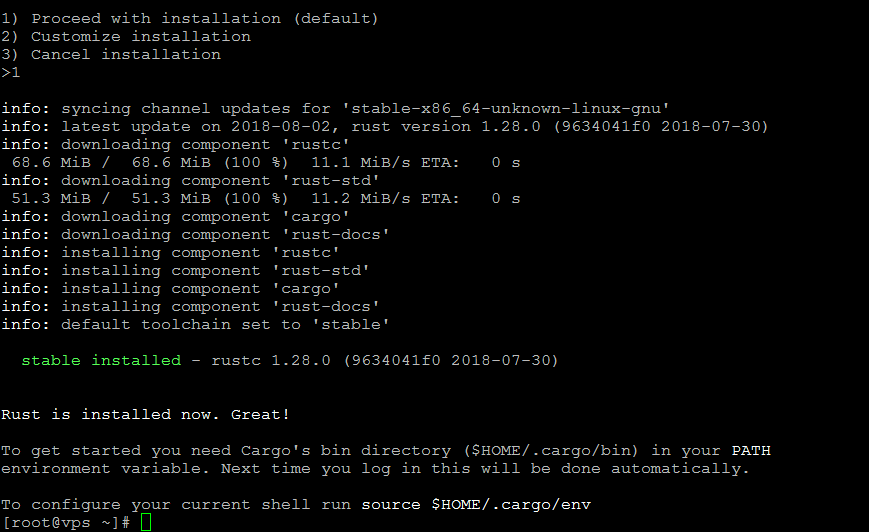
The final step is to logout and the back in. To make sure Rust was installed correctly, insert the following command to check the version:
rustc --version
The result should be similar to this:

Additional Notes After Installing Rust
Rust has a 6 week fast-release schedule so be sure to get and check new builds often. All builds are managed by rustup from beta to nightly and so forth so be sure to check it out. The official page has a very well organized documentation complete with usage examples. Make sure to have a look there if you’re new to Rust. If you’re having issues with the environment path, you can configure it manually by following the documentation guide.
Final Notes
Installing Rust on CentOS is a quick process thanks to the official rustup installer, making it easy to get started with modern system-level development. Once Rust is set up, keeping your system properly configured and up to date is equally important for stability and security.
If you are working on a fresh server, it is recommended to review the initial settings of a CentOS 7 VPS server to ensure your environment is optimized before deploying applications. With a properly prepared system and regular updates, Rust provides a reliable and efficient foundation for building high-performance software.
Frequently Asked Questions About Installing Rust on CentOS
What is Rust designed for?
How can I install Rust on a Linux machine?
What should I do after installing Rust to ensure it was successful?
How often are new builds of Rust released?
Enjoy Rust!


