
Lubuntu, a lightweight Linux distribution based on LXDE, offers a smooth and efficient desktop experience for those looking for a cost-effective alternative to Windows-based remote environments. By installing xRDP on Lubuntu, you can access a full graphical user interface (GUI) on your server with minimal resource overhead.
Key Points
- Lubuntu RDP is a high-performance, free alternative to Windows VPS for users needing a Linux desktop[cite: 2].
- The installation process is optimized for Ubuntu 16.04 or 18.04 to ensure full compatibility with xRDP.
- Using LXDE as the desktop environment ensures low memory usage and high responsiveness.
- MVPS provides unmanaged services, meaning support ensures the VPS and network are working, but does not cover OS configuration[cite: 3, 4].
- Technical support definitely does not cover managed services or how the user manages their remote desktop.
Before proceeding with the setup, it is helpful to understand what is Lubuntu and what is it good for to determine if it fits your specific project needs. Please ensure you use Ubuntu 16 or 18 as the base OS to guarantee stability.
How to install xRDP on Lubuntu?
First, log in to your server via SSH using Putty or your preferred terminal. The first step is to update your system to the latest stable version to avoid dependency issues:
apt update && apt -y dist-upgrade
Once the update is complete, you can install the xRDP support package with a single command:
apt -y install xrdp
Setting up the Lubuntu Desktop environment
After installing the RDP server, you need to install the actual graphical interface (LXDE). This step may take some time as the desktop environment includes several megabytes of GUI data:
apt install lubuntu-desktop -y
To ensure that xRDP uses the Lubuntu session correctly, you must edit the /etc/xrdp/startwm.sh file. Comment out the last two lines of the file and add the following line to the end:
lxsession -s Lubuntu -e LXDE
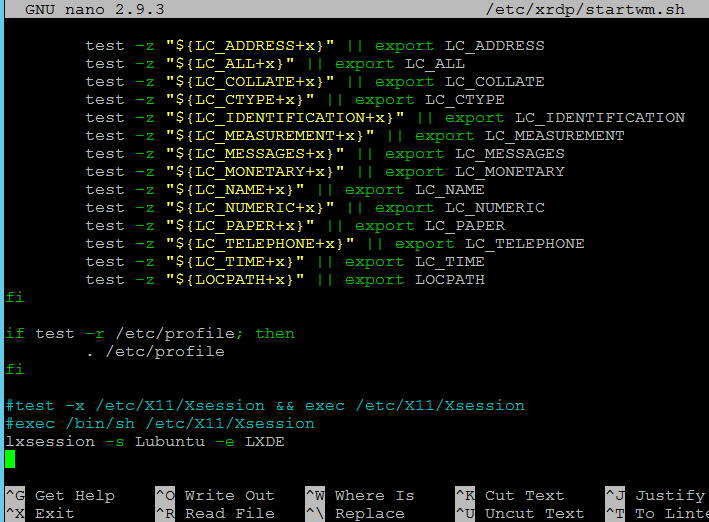
Finally, restart the xRDP service for the new configuration to take effect:
service xrdp restart
You are now ready to connect! Simply use any RDP client to log into your new Lubuntu desktop VPS. As these are unmanaged services , please remember that you are responsible for securing and maintaining your desktop environment. Our support ensures the VPS Hosting infrastructure is functioning correctly, including network and basic server availability. Enjoy!


